Contents17
- Why product ad prompts go wrong
- The parts of a product video prompt
- Subject
- Setting
- Camera
- Light
- Action
- Style and mood
- Example AI video prompts for product ads
- Beauty serum
- Running shoe
- Coffee
- Formats for social media ads
- Start from a real product photo
- Tips for testing and improving prompts
- Common mistakes with product video prompts
- Measuring which prompt works
Most AI video tools will turn almost any sentence into a moving clip. Getting a clip where your product still looks like your product is the hard part. That depends more on the prompt than on the tool, and prompting is a skill anyone on your marketing team can pick up.
Brands use AI video for product ads because it lets them test many visual ideas without a full shoot for each one. This guide covers the parts every prompt needs and example prompts for three kinds of product. It also covers the formats each social media placement wants and the mistakes that waste a run.
Why product ad prompts go wrong
A video model has never seen your product. It fills every gap in your prompt with a guess, and with products those guesses show up fast. Labels turn into gibberish, a pump bottle grows a second nozzle and a watch face changes between frames.
Short prompts are the usual cause. A prompt like "perfume bottle on a table, cinematic" leaves the lens and the light up to the model. It also leaves the motion open, so every generation comes out different.
The fix is to write each prompt like a shot list for a single setup. Describe what a director of photography would tell the crew, in the order they'd need it. When you use AI to animate a real product, accuracy matters more than spectacle.
The parts of a product video prompt
Every prompt we write for a product ad covers the same ground in roughly the same order. Many models give the opening words the most weight, so the product goes first.
Subject
Name the product plainly and describe it the way a packaging spec would. Give its material, its colour and its size against something familiar, such as "a palm-sized amber glass dropper bottle". Tell the model to keep the shape and label unchanged when you work from a product photo.
Setting
Put the product on a real surface with a background the viewer understands. A marble counter in a bright bathroom reads as skincare, while a concrete step outside a gym reads as sportswear. Keep the background simple, because every extra object is one more thing the model can distort.
Camera
This line sets most of the ad's feel, so give it real detail. Specify the shot size and lens, then a single motion, such as "slow push-in to a close-up, shallow depth of field". Camera moves that suit products are slow orbits, push-ins, gentle slides along a surface and top-down reveals. Fast whip pans and shaky handheld work tend to bend the product's shape, so save them for lifestyle shots with people.
Light
Light decides whether the product looks premium or cheap, more than any style word you add at the end. Describe the source and its direction, such as "soft window light from the left, warm late-afternoon tone". Mention reflections for glass and metal, and ask for soft shadows under the product so it sits on the surface instead of floating.
Action
Decide what happens in the clip and keep it to one action. Good single actions are a lid twisting off or a hand setting the product down on a shelf. A clip that asks for a pour, a spin and a reveal in a few seconds usually gets all three wrong.
Style and mood
Finish with the look you want, such as "commercial product cinematography, clean colour grade, high detail". Name the desired mood in one or two plain words rather than stacking adjectives like "epic" and "stunning". Where your tool supports a negative prompt, use it for things like warped text and extra parts.
Example AI video prompts for product ads
Each example below follows that structure, so you can swap in your own product and keep the rest.
Beauty serum
Close shot of a small amber glass dropper bottle with a plain white label, standing on a wet grey marble counter in a bright bathroom. Soft morning light comes from a window on the left, with gentle reflections on the glass. Slow push-in from a medium shot to a close-up, shallow depth of field, as a single drop falls back into the bottle. Clean commercial look with a calm mood and natural colour.
The bottle comes first and gets a real material and colour. There's one slow push-in and one small action, which keeps the glass from bending as the shot closes in.
Running shoe
Low-angle tracking shot of a white running shoe on a runner's foot, moving along a quiet Dubai waterfront path at sunrise. The shot stays at ankle height and travels alongside the runner, matching their pace. Warm low sunlight from behind, long soft shadows and a light haze over the water. Realistic sports commercial style with natural motion and sharp focus on the shoe.
Shoes suit a person in the shot, because the product only makes sense in motion. Keep the shoe sharp and the runner's face out of frame, which avoids the odd-looking faces some models still produce.
Coffee
Top-down shot of a plain white ceramic cup on a wooden cafe table, next to a folded linen napkin. Steamed milk pours into the coffee and forms a simple pattern as the camera slowly rises. Soft daylight from a large window, warm colour and fine steam visible against a dark background. The cup and the pour are the only subjects, in a natural food commercial style with rich browns.
Food and drink prompts gain the most from a specific physical action. A pour, a crack of crust or a spoon lifting honey gives the model something real to render.
Formats for social media ads
Decide the format before you write the prompt, because composition changes with the frame. Vertical video suits Reels, TikTok and Stories, so keep the product centred and leave room at the top and bottom for captions. A square frame suits feed posts and the product cards on your website. Widescreen fits YouTube pre-roll and the banner on a landing page.
Most models generate short clips of a few seconds, so plan each ad as several shots edited together. A simple pattern opens on the product in action, cuts to a close detail and ends on a clean frame for the end card. Your logo and offer text go on in the edit, because most models still struggle to render text cleanly. Planning the shots this way also makes your social media content easier to reuse, since each shot works alone as a short edit.
Start from a real product photo
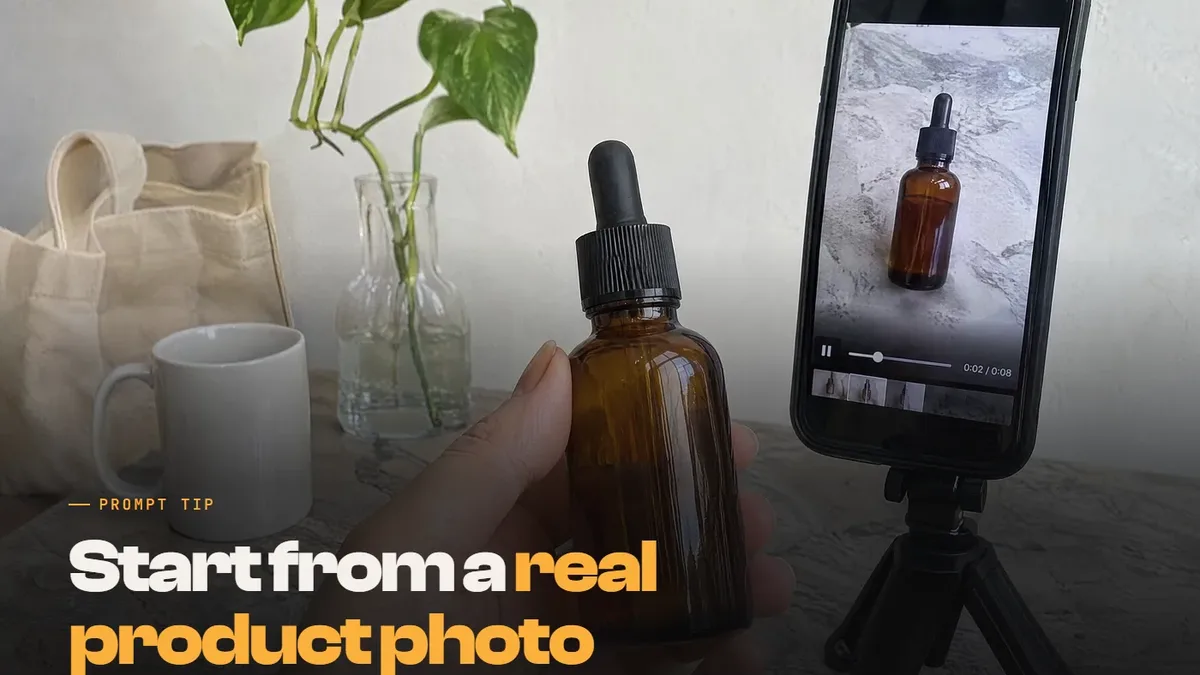
Using AI for product video doesn't remove the need for good source images. Text prompts alone are fine for testing ideas, but for a live ad, animating a real product photo is the safer route. Image-to-video solves most of the label problem, because the model takes your photo as its starting frame.
The photo needs to be sharp, evenly lit and shot at the angle you want the clip to open on. Clean source images are one more reason to invest in proper product photography. In the prompt itself, describe only the motion and the camera, and tell the model to keep the product unchanged. Restating the product's look in detail can make some models redraw it, which is the opposite of what you want.
Tips for testing and improving prompts
Treat each prompt as a first draft and change one thing at a time between generations. If the product warps, simplify the motion before you touch anything else. If the light looks flat, give it a direction and a time of day. Keep a shared log of each prompt and its result, so your content team can reuse a winning prompt for the next product.
One focused session with a clear shot list usually beats a day of random tries, because you learn what your model responds to. Generating several versions of the same prompt helps too, since identical words give slightly different results each run.
Common mistakes with product video prompts
The most common mistake is asking the model to write your brand name on screen, when text belongs in the edit. The second is cramming several shots into one prompt, which gives you a clip where nothing quite finishes. A third is asking a presenter to speak a line while the product turns, which usually fails on both counts. Prompts copied from image tools cause trouble too, because they describe a still picture and give the model no motion to follow.
Models are changing rapidly, so re-test your strongest prompts whenever your tool ships a new version. Check every clip frame by frame before it runs, because a warped label or an extra finger is easy to miss at full speed. Match the visual style to your shot footage too, so AI content doesn't look out of place in the same campaign.
Measuring which prompt works
A good prompt is one whose ad gets results, so judge each version by what it does in the ad account. Run a few prompt variants against the same audience on social media and compare cost per lead once the numbers settle. The Adnika Dashboard: one live view of a client's ads, analytics and CRM data, with AI recommendations reviewed by the strategist. When we produce AI video ads for a client, each variant's results show up there, and the next prompts build on what worked.
If you'd rather pass the prompting, editing and testing to a team, that's what our AI video production service covers. These habits carry over to stills and captions, and our team covers that side of your content under AI content generation.