Contents11
- The six parts of a product photo prompt
- Copy-ready AI image prompts for product photos
- White background shot for your shop listing
- Lifestyle scene at home
- Close-up of texture and detail
- Flat lay for social posts
- Product in hand
- Keep your real product in the picture
- Shadows and reflections make it look real
- Compare versions and keep what sells
- When a camera still wins
Most weak AI product photos share one cause: the prompt describes a mood instead of a photograph. A line like "luxury perfume bottle, high quality" gives the model nothing to aim at, so it fills every gap with a guess. A good prompt reads like the brief you'd hand a studio photographer, and each template below follows that pattern.
The six parts of a product photo prompt
Write your AI image prompts in the same order, so you can tell which part changed when a result goes wrong. These six parts cover almost any product shot you'll need for a shop or an ad.
Product: name the item and what it's made of, for example "a matte black ceramic mug with a curved handle".
Setting: describe the surface and the background, such as "on a pale travertine plinth against a warm beige wall".
Light: give the source and its direction, such as "soft window light from the left, reflector fill on the right".
Camera: set the angle and the lens, such as "a low three-quarter view on a macro lens".
Composition: say where the product sits in the frame and how much empty space you need for a headline.
Style: finish with the look, such as "realistic commercial product photography with crisp focus".
Keep each part short and concrete, because many image models give the opening words more weight than the rest. That's why the product goes first and the style words go last. If you want more background on how today's image models work, read what Google's Nano Banana study found about AI image generation.
Copy-ready AI image prompts for product photos
Copy these templates and swap the words in brackets for your own product. Each one gives the model a full brief, so you spend your time choosing between results instead of fixing them.
White background shot for your shop listing
Prompt: "Studio product photo of [your product] centred on a seamless pure white background, lit by two large softboxes. Eye-level view with sharp focus and a soft natural shadow under the base."
Many marketplaces ask for a plain backdrop on the main listing image, so this is the shot to get right first. Check thin parts such as straps and cables closely, because models often blur or merge them.
Lifestyle scene at home
Prompt: "[Your product] on a light stone kitchen counter in a bright Dubai apartment, morning sun through a tall window. Shallow depth of field, with a plain mug softly blurred behind the product."
Pick a scene from your buyer's own day, such as a gym bag on a bench or a desk by an office window. A setting the buyer recognises shows how the product fits into their life, which a studio shot can't do.
Close-up of texture and detail
Prompt: "Macro close-up of [the stitching or clasp] on [your product], with low side light raking across the surface. Shallow depth of field on a dark neutral background, with the texture in crisp focus."
Detail shots answer a buyer's questions about quality, so use them for leather, knitwear, jewellery and anything where the finish matters.
Flat lay for social posts
Prompt: "Top-down flat lay of [your product] with [two related items] on a pale linen cloth, in soft diffused daylight. Even spacing, a muted colour palette and clear space at the top for a headline."
Ask for a square or tall crop to suit your feed, instead of cropping a wide image later and losing the edges.
Product in hand
Prompt: "A hand holding [your product] at chest height in a softly blurred cafe, warm window light from the side. Relaxed grip with short natural nails and realistic skin texture, the product turned towards the camera."
Hands are still a common weak spot in AI images, so count the fingers and check the grip before anything goes live. If one looks wrong, regenerate the image instead of patching the hand in an editor.
Keep your real product in the picture
A model that draws your product from a text description alone will invent it, however detailed your words are. The shape drifts, label text turns to nonsense and logos come out wrong. That's a problem the moment a buyer holds the parcel next to your photo.
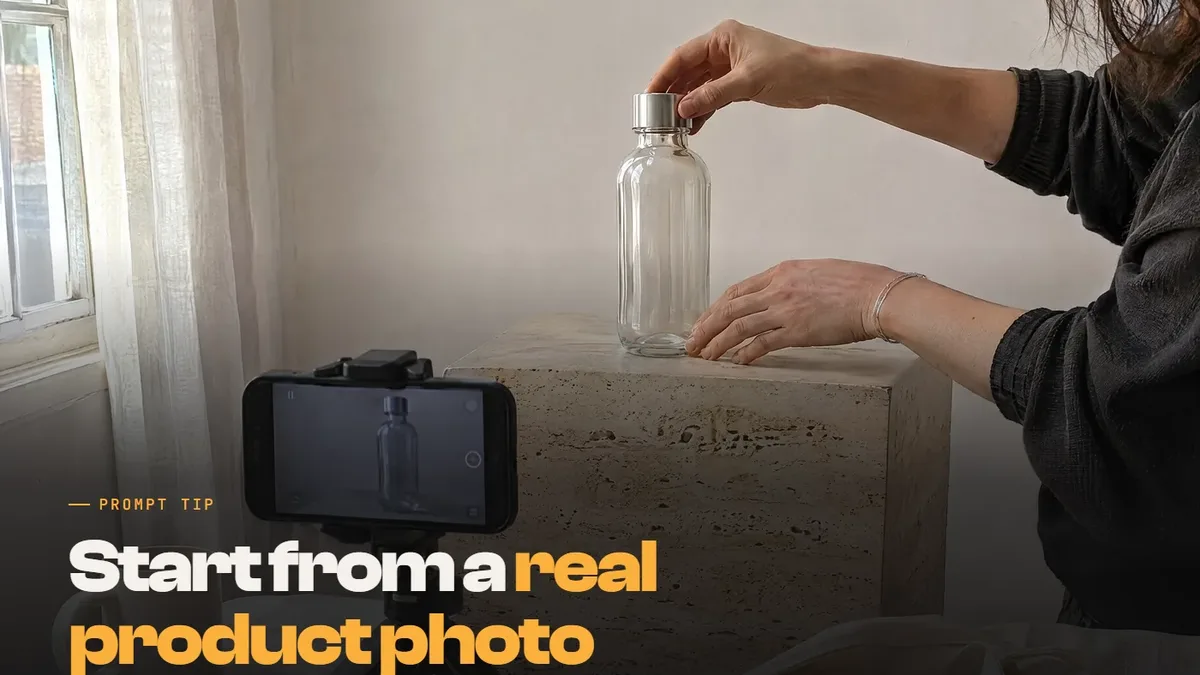
The fix is to start from a real photo of the item you sell. Upload a clean shot of the product, even a phone picture against a plain wall. Then use the model's reference or edit mode to replace the background and leave the product alone.
Write the prompt about the scene only, because the product is already in the frame. For example: "Place this product on a polished walnut desk beside a closed laptop, in warm late afternoon light." If the model still softens your logo or the small print on the label, add them back in an image editor. It's a small step, and it means the photo shows exactly what the buyer will receive.
Shadows and reflections make it look real
When a product image looks fake, the usual cause is that the product floats above the surface instead of resting on it. Ask for a contact shadow where the base meets the surface, and name the light's direction so the shadow falls correctly.
Glossy products need a reflection too, so for glass, metal and lacquer add "a faint reflection on the polished surface below" to the prompt. Without it, even a sharp, well-lit product looks as if it was pasted onto the background.
Compare versions and keep what sells
Change one part of the prompt at a time and save every version with the exact words you used. When you compare two results side by side, you'll know whether the light or the surface made the difference. A shared prompt log also stops your team from rewriting good AI prompts from memory.
How an image looks in the generator matters less than how it performs in front of buyers. Run the AI image and your current photo as two versions of the same ad. Let clicks and orders decide which one earns a place on the product page.
For Adnika clients, the results of those ad tests sit in one place alongside the rest of their marketing. The Adnika Dashboard: one live view of a client's ads, analytics and CRM data, with AI recommendations reviewed by the strategist. On an image test, you judge both versions of the ad on the same numbers before you pick the photo that stays.
When a camera still wins
Some shots still need a real shoot, and AI works better when it has good source photos to build on. Exact fabric colour, small print on packaging and a launch hero image are all safer from a camera. When you need those source photos shot properly, start with ecommerce product photography in Dubai.
If you'd rather not write AI prompts and edit images yourself, read about our AI content generation service in Dubai. Better photos only pay off when buyers reach the page, so pair them with Shopify SEO for product pages in Google and AI search.