Poses you can direct
Guide lines and plain cues show where the weight sits and what to say to the person posing.
Our own iPhone posing app had to take photographers and the people they photograph from finding a pose to getting it right on set.

We designed and built Poses4You, an iPhone app with a catalogue of photo poses, most drawn with guide lines and two numbered cues. It adds smart search, a camera view that checks the pose live, and AI tools that start from a photo of you.
Posing app for iPhone, in beta
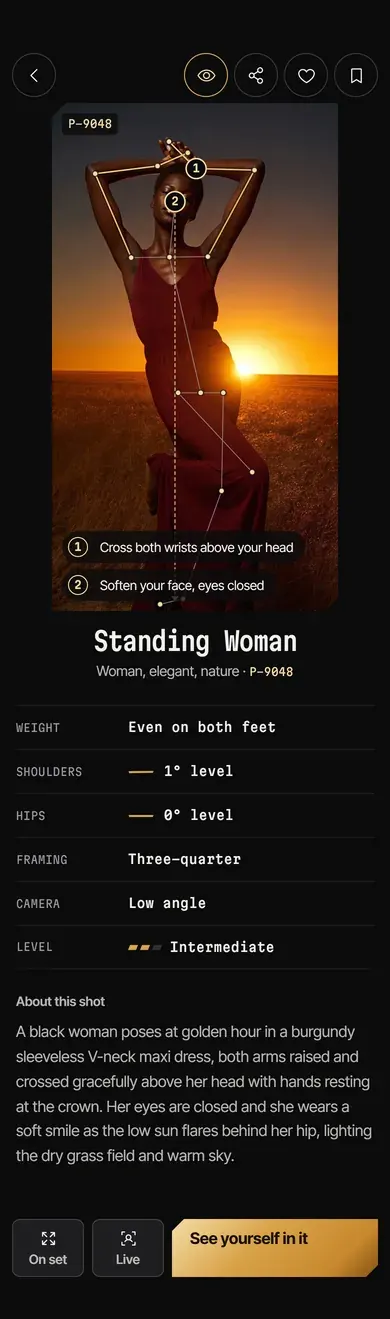
Scene 01 / Pose page
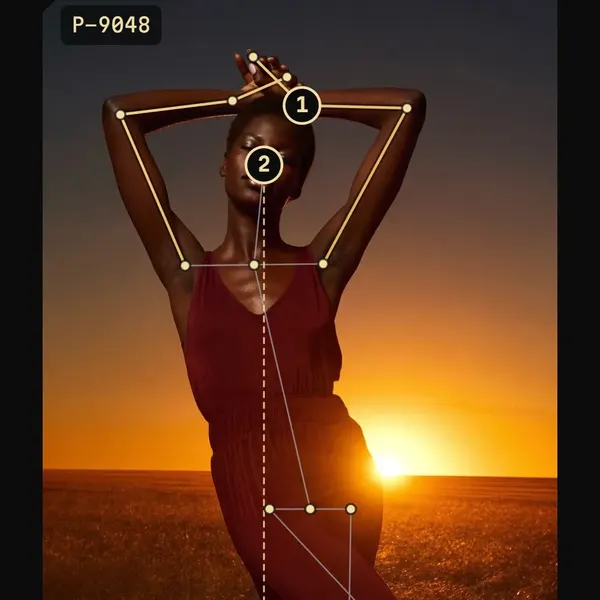
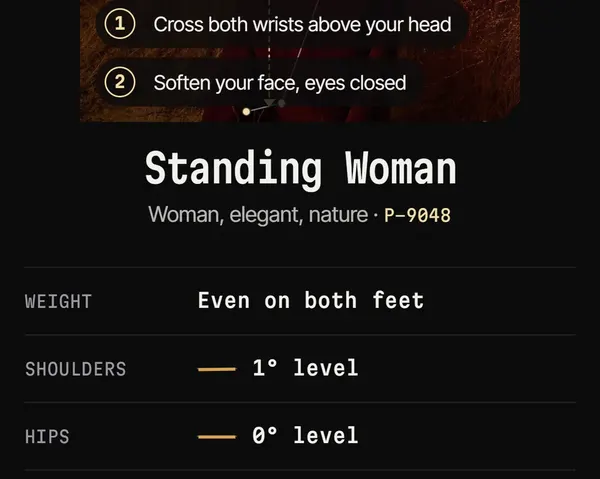
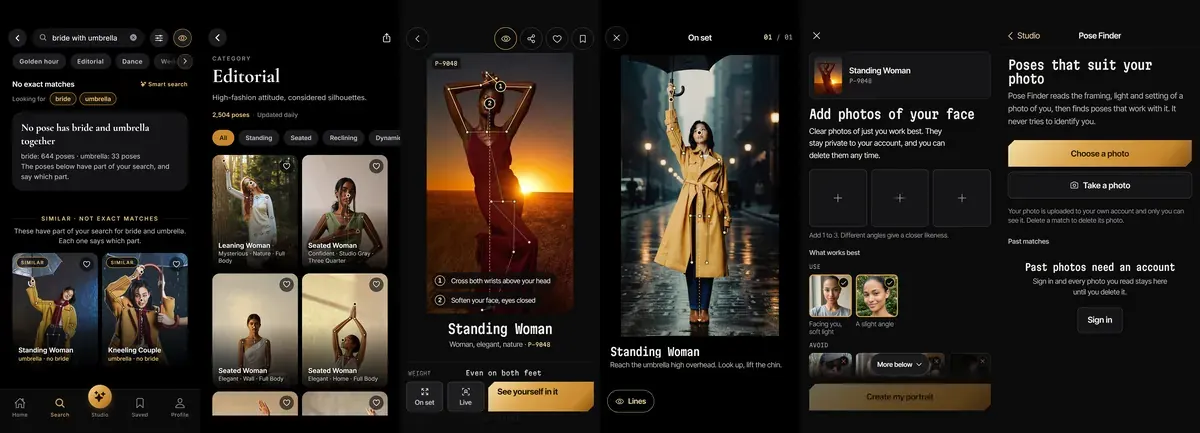
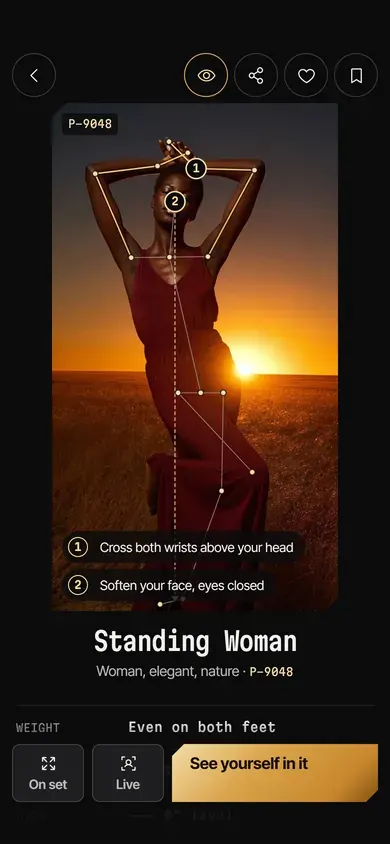
A pose opens with its guide lines and two numbered cues on the photo, then where the weight sits and how to frame the shot.
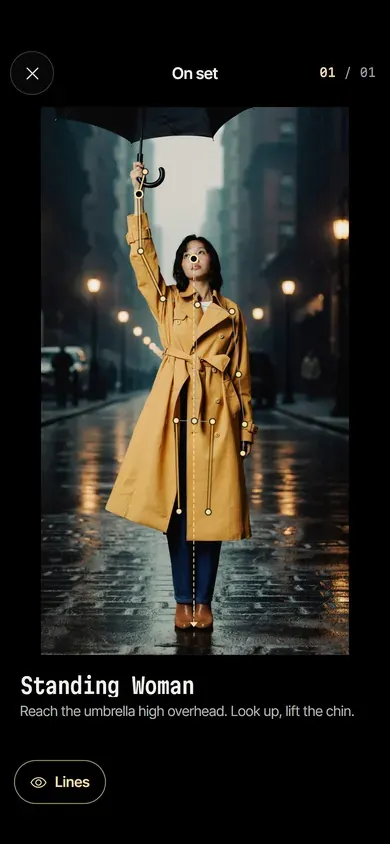
Scene 02 / On set
On set fills the screen with the pose for the person being photographed, with the guide lines one tap away.
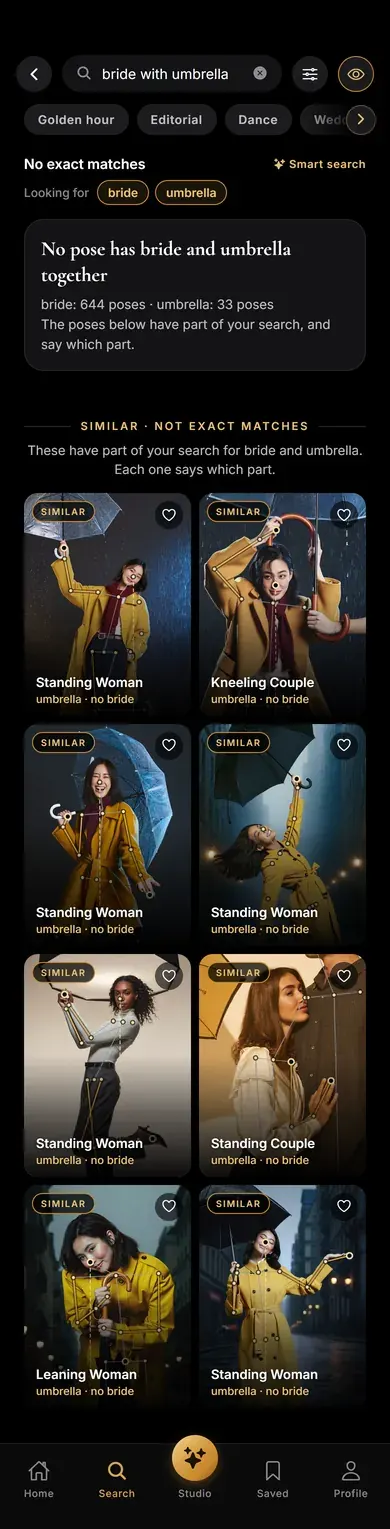
Scene 03 / Smart search
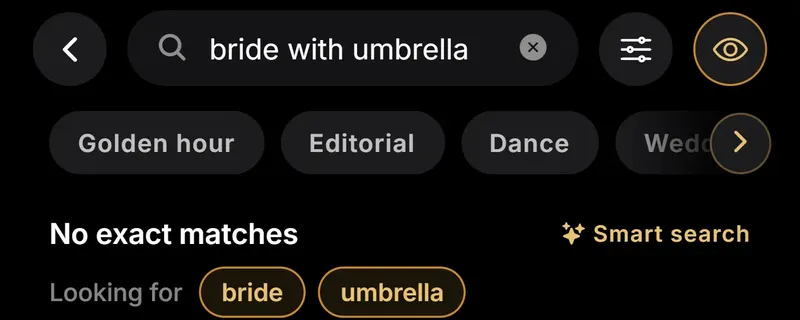
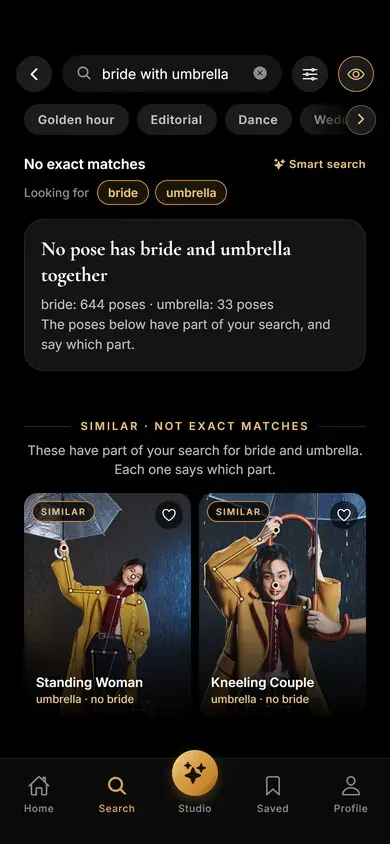
Smart search reads a search as parts and shows close matches, each saying which part it lacks.

Scene 04 / Categories
Every category opens as a grid of poses, those with guide lines first.
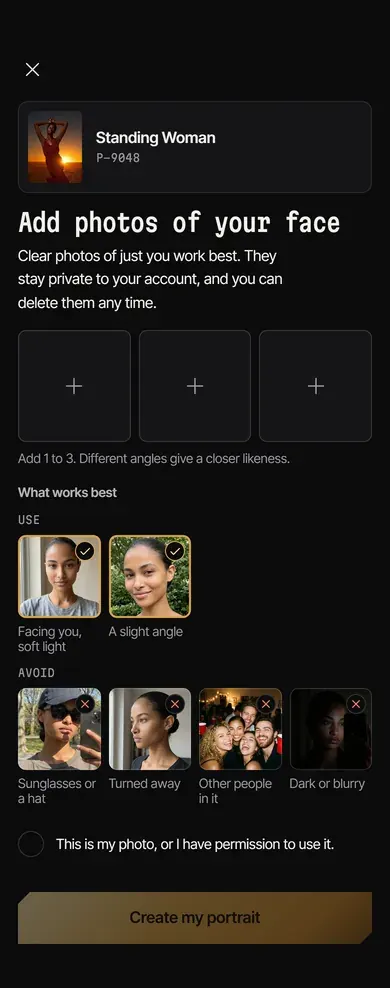
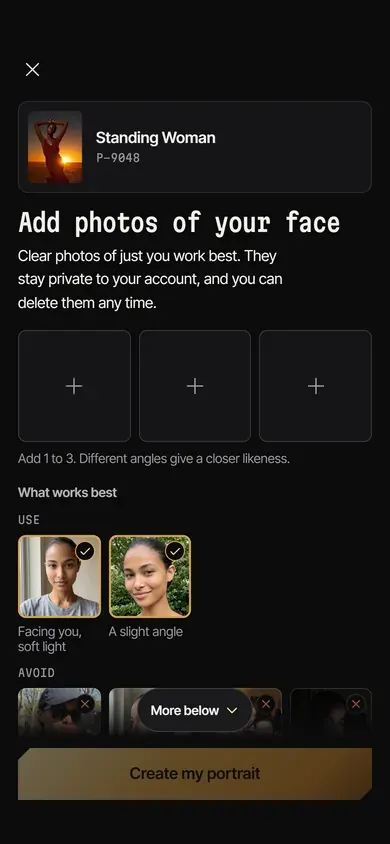
Scene 05 / See Yourself
See Yourself starts from the chosen pose: add up to three photos of your face, with examples of good and poor photos.
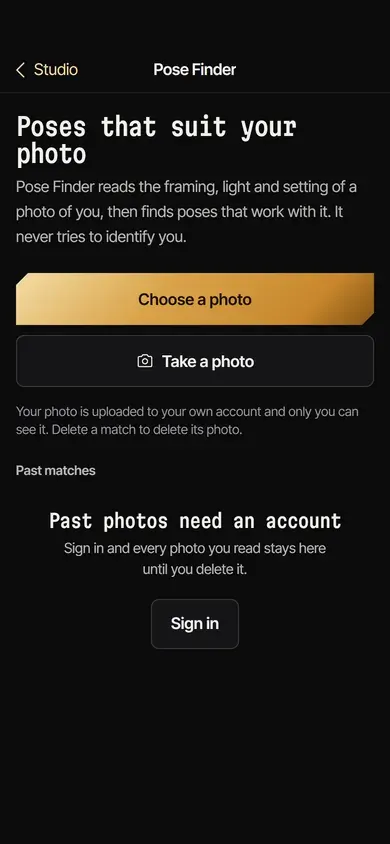
Scene 06 / Pose Finder
Pose Finder reads the framing, light and setting of a photo of you, then suggests poses that suit it.
We are developing Poses4You ourselves: a posing app for iPhone, for photographers and the people in front of the camera. It holds a catalogue of photo poses, most drawn with guide lines and cues. Around them sit smart search, boards for each shoot and AI tools that work from a photo of you. The app is in beta on TestFlight and not yet on the App Store.
This page covers what we set out to build, how we designed and built it, and what the beta does today.
A photo shows a pose but not how to hold it, so the app had to explain poses and carry them to the shoot.
A pose photo does not say where the weight sits or what to tell the person posing. Each pose needed lines on the photo and cues in plain words.
The first search matched words, then filled the screen with the nearest photos, related or not. A search for two things needed poses with both, or a clear note when none had both.
Checking a pose live means reading a person's body through the camera. This had to happen on the phone, one frame at a time, with nothing about the person stored.
See Yourself had to put a person's own face into the pose they picked. The first image model behind it was withdrawn by its provider, so we tested others with the same face and the same requests.
We built three full-flow iPhone prototypes of a redesign and rebuilt the app in the one picked. After testing it on the phone, we kept the earlier flow and moved over the new pose page, guide lines and Studio.
The app is written in TypeScript with React Native and Expo. Supabase holds the accounts, the catalogue, search and private storage, and JavaScript fixes reach phones over the air at their next launch.
Smart search splits a search into parts. Poses with every part come first, and similar poses follow, each saying which part it lacks.
Guide lines and two numbered cues sit on the photo. Below them, the pose page lists the weight, the shoulders and hips, the framing, the camera angle and the level.
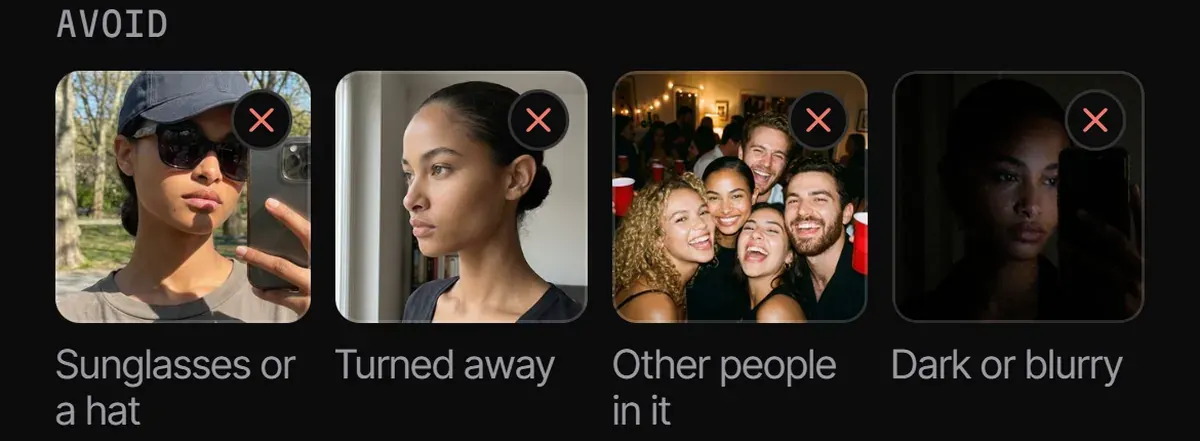
See Yourself turns one to three photos of your face into a portrait of you in the chosen pose. Before you add them, it shows which photos work and which to avoid.
Search, categories, the pose page, On set, See Yourself and Pose Finder share one design: true black, gold guide lines and editorial type.
Point the camera at the person and the pose sits over the live view. Each limb lights up as it matches, and nothing about the person is stored.
Photos leave the phone only for the AI tools and go to private storage. Access rules sit in the database, so one account cannot read another's data.
Select a page to open its screen.
Why it worked
Each screen answers a question a shoot raises: which pose, how to hold it, and whether the person has it.
Guide lines and plain cues show where the weight sits and what to say to the person posing.
Results hold every part of the request or say which part they lack, so unrelated photos stay off the screen.
Live Guide works on the phone and keeps nothing. Photos for the AI tools go to private storage, and you delete them from Settings.
JavaScript fixes reach testers' phones at their next launch, without waiting for a new build.
Client stories
On camera and in writing — swipe through the founders and teams we’ve helped design, build and grow.
In their words
GMC is thrilled to extend our heartfelt appreciation to Adnika! Collaborating with Ehsan and his team has consistently been an absolute delight. Ehsan's dedication and commitment have ensured that German Medical Center remains an exceedingly satisfied and happy client, especially regarding their Hubspot Onboarding, Digital Marketing, Website Development, Content Creation and Social Media Marketing. Adnika is indeed the Best Digital and Growth Marketing Agency in UAE!
Adnika provided us with their Inbound Sales and Marketing solutions through Hubspot. They helped us generate more qualified leads for our sales team, drive website traffic, increase customer engagement, and grow our customer base. Adnika is a reliable partner that has always taken our specific goals and needs seriously.
Adnika has helped us plan, implement and optimize ad campaigns on Facebook and Instagram. Adnika is truly committed to Performance Marketing. They provided us with a fantastic dashboard with detailed KPIs that helped us track the campaigns’ performance in real time. Adnika also gave us helpful and dedicated support during the whole project, and the campaigns turned out to be a great success. We highly recommend working with Adnika's growth experts.
We really enjoyed working with Adnika’s team. Not only are they talented, but they all take the time to understand whom they're working with, what they're trying to accomplish, and how to help the business achieve its goals. The quality of work we've experienced has made a huge difference for us and helped drive new business.
Adnika helped Sea Technology with setting up new digital channels, such as Google Search Ads, to attract more customers and leverage our brand. We are very satisfied with the results and we will continue with the implementation of lead generation, marketing automation, and performance marketing.
Working with the Adnika team has been a real pleasure! Extremely friendly, Ehsan and Elin are always available with prompt replies, valuable insights, patience, a problem-solving attitude, and high knowledge. Super easy to work with them. I highly recommend the Adnika team to help your business!
I am an artist, but I also manage a collective of DJs. In order to promote our services to our clients, we needed Inbound solutions that could attract the right traffic and promote the brand. Adnika built and designed our Inbound processes as well as create and manage campaigns on social media and Google Ads which helped us attract many more customers. I’m very happy!
We've been using Adnika growth marketing solutions only for a few months. They are highly professional, competent, experienced, and creative. Get ready to get to work with this agency. They will come alongside you as a business owner and feel your pain and joy! Get ready to transform your business.
About this project
What clients ask us after reading this case study.
React Native and Expo, written in TypeScript, with Supabase for accounts, the catalogue, search and private storage. Live Guide uses Apple Vision on the phone, See Yourself uses Google's Nano Banana 2 through fal.ai, and Pose Finder uses Anthropic's Claude.
Not yet. It is in beta on TestFlight, and the App Store version is being prepared.
No. Body detection runs on the phone one frame at a time, and nothing about the person is saved. Only a photo the photographer takes is kept.
Yes. Poses4You is our own iPhone app, built with React Native and Expo. See our mobile app development service.
Yes. Poses4You makes AI portraits and reads photos to suggest poses, with the photos kept in private storage. See our AI services.
No questions match — try another search.
More work
A Dubai brokerage website with live CRM listings, map search and valuation tools.
One English and Arabic website for every department of a Dubai Healthcare City clinic.
A homepage film that walks visitors into the group's building as they scroll.
One WordPress site for a door hardware range, from smart locks to drawer slides.
A Shopify store for a UAE office furniture maker, for single pieces and whole offices.
A bilingual website for a Dubai clinic offering dentistry, surgery and skin treatments.
Our mobile app development service in Dubai.
Next step
A straight read of your idea, the screens it needs and what to build first, with the findings written down, whether or not you work with us.