Contents14
- What CRM means in plain words
- What a CRM system does day to day
- The three main types of CRM
- Where your CRM system runs
- How AI is changing CRM software
- What goes into a CRM system
- Benefits of CRM for sales, marketing and customer service
- Who uses CRM software, and how
- CRM features worth checking
- How CRM pricing and costs work
- How to choose the right CRM
- Getting started with a new CRM system
- Common CRM mistakes to avoid
- How Adnika works with CRM
What CRM means in plain words
CRM stands for customer relationship management. The phrase describes a way of running a business around the people who buy from it. It also names the software that keeps everything about those people in one place. When a sales manager tells someone to check the CRM, they mean that software, the CRM system the team opens each morning.
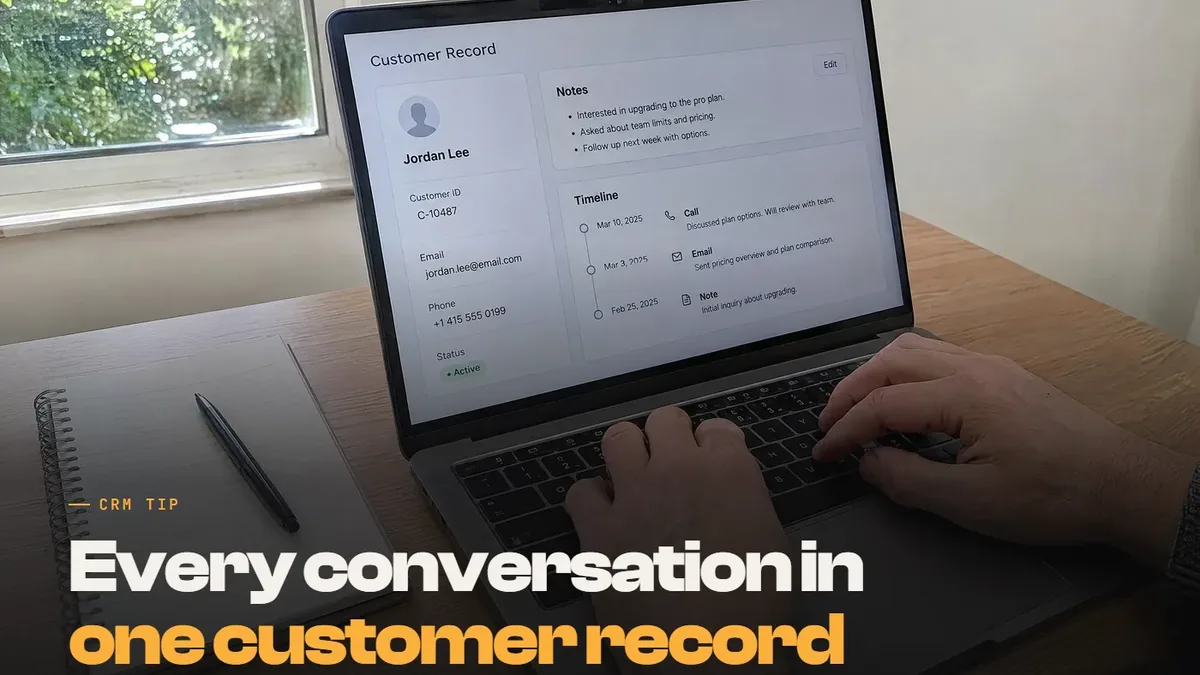
A useful definition is short. A CRM is a shared database of customers and potential customers, with tools on top that help your teams act on what it holds. Calls, emails, orders and other customer interactions are all saved against the right contact. Anyone with access sees the full history before they pick up the phone.
Before CRM software, that history lived in inboxes, spreadsheets and the memory of individual sales reps. When a salesperson left the company, many of their customer relationships left too. A CRM changes that by turning customer information into something the business owns, rather than something one person carries around.
What a CRM system does day to day
Most of the value comes from ordinary work done the same way every time. A new lead fills in a form on your website, and the CRM creates a new contact on its own. It notes the page they arrived on, the ad or social media post that brought them and the message they sent. The lead is then assigned to the right person on the sales team without anyone forwarding an email.
From there, the CRM tracks the deal through each stage of your sales pipeline. Reps log calls and set follow-up tasks, while managers see how much revenue sits at every stage. When the deal closes, the customer moves to onboarding or account management with the full history attached.
After the sale, the same history serves customer service. A support agent opening a ticket can see the customer's purchase history, who sold it and every earlier conversation. That context shortens calls and spares customers from repeating themselves, which is one of the quickest ways to lose their goodwill.
Marketing works from the same customer data too. Marketers build segments from what customers have bought, opened and clicked, then run marketing campaigns aimed at each group. Because the results flow back into the CRM, you can see which campaigns produced revenue as well as which produced clicks.
The three main types of CRM
Writers group CRM tools in different ways, but most guides describe three types of CRM. Each type leans towards a different job, and most modern products mix all of them.
Operational CRM automates the routine work your sales and customer service teams repeat every day. It covers lead management and task reminders, and it routes follow-up emails and tickets to the right person. Sales automation sits here too, such as moving a deal forward the moment a contract is signed. This is the type most small business owners picture when they first hear the word CRM.
Analytical CRM turns stored records into insights through data analysis. It shows which channels bring the customers who stay longest, and where sales opportunities tend to stall. Forecasts and lifetime value reports belong to this type, along with summaries for each team. It helps management teams make data-driven decisions instead of relying on whoever argues loudest in a meeting.
Collaborative CRM supports collaboration by sharing customer information across departments and, in some cases, with outside partners. Its job is to make sure sales knows about an open complaint before calling, and that customer service knows about a renewal in progress. In companies with a separate team for each stage, this is often where the biggest gains appear.
Some vendors name a fourth group, strategic CRM, which centres the whole setup on long-term customer retention. In practice the label matters less than the job. Ask which part of your customer journey most needs help right now, and weigh products against that.
Where your CRM system runs
There is a second way to sort types of CRM systems, and it's about where the software lives and how you reach it.
A cloud-based CRM runs on the vendor's servers, and your team signs in through a browser or an app. Nothing needs installing, and the vendor takes care of updates and backups. Most new buyers choose cloud CRM for that reason, and HubSpot works this way.
An on-premise CRM is installed on your own servers. It gives you full control over where data is stored, which some sectors with strict data rules prefer. The trade-off is that your own IT team owns maintenance, upgrades and security for as long as you run it.
Mobile CRM is less a separate type than a way of working. Field sales reps and customer service staff update deals and notes from their phones between visits, so the office sees changes the same day. If your people spend most of the week on the road, test the mobile app before you sign anything.
Open-source and customisable CRM solutions sit at the far end of the range. You can change almost anything, but you'll need developers to make and maintain those changes. For most companies, a well-configured commercial CRM platform is the safer choice.
How AI is changing CRM software
AI has moved from a sales pitch to a standard feature in a short time. Most customer relationship management software now includes some form of it, and the useful parts are fairly practical.
The first is data entry, where AI can log emails and meetings automatically, pull contact details from signatures and fill in missing company fields. Salespeople get back hours that used to go on administrative work, and their productivity rises with it. Contact details also end up more complete than manual data entry ever made them.
The second is scoring and prediction, where an AI CRM uses machine learning on past deals to estimate which open ones are likely to close. It also flags new leads that resemble your most valuable customers. That gives your sales team a ranked list each morning instead of a long, flat queue. The same logic can be built with clear rules, and our page on lead scoring setup and consulting explains how those rules are chosen.
The third is assistance. Many platforms now let you use AI agents to draft follow-up emails, summarise calls or answer simple customer questions in chat. These tools save time, but they only work as well as the data they read. A CRM full of duplicates and blank fields will produce confident suggestions that are wrong.
That is why the first AI project in many companies turns out to be a data clean-up. It pays off whether or not you switch the AI features on, and it makes every later report more trustworthy. AI tools learn from the same history, so gaps in the data become gaps in their advice. When you use AI inside a CRM, keep a person reviewing anything that goes out to a customer.
What goes into a CRM system
CRM data falls into a few broad groups. Identity data covers who a person is, such as their name, job title, company and contact details. Activity data logs customer interactions, from emails and calls to website visits. Deal data shows which products and services they're buying and how far along that purchase is.
The amount of data in a CRM grows quickly, because every email and visit adds a new activity record. That volume is what makes reporting possible, as long as everyone fills in fields the same way.
A well-kept CRM also tracks customer behaviour over time. You can see when a buyer went quiet, which emails they opened before a purchase and how often they contact customer support. Patterns like these help you identify accounts at risk long before they cancel.
Benefits of CRM for sales, marketing and customer service
The benefits of CRM look different depending on who you ask.
For sales, the gain is focus. Reps see every open deal, its next step and its last contact in one view. Managers get a sales pipeline they can forecast from, rather than a spreadsheet that's out of date by Tuesday. Deals that go quiet get noticed sooner, which tends to shorten the sales cycle.
For marketing, the gain is precision and better customer engagement. Marketing teams can see which marketing campaigns produced paying customers, and move their budget towards those. They can also run personalised marketing, sending each segment content that fits where it sits in the entire customer lifecycle. Email marketing campaigns built on CRM data read as relevant, because they are based on what the reader has done.
For customer support, the gain is context. Agents see the customer's history and open issues on one screen, so they solve problems in fewer steps. Over time, that consistency lifts customer satisfaction and drives customer retention, since people tend to stay with companies that remember them.
For leadership, the gain is one version of the truth about each customer relationship. Senior management can track revenue, lifetime value and churn from the same data the teams use every day. Decisions get made faster when nobody has to reconcile three spreadsheets first.
Who uses CRM software, and how
CRM is no longer reserved for large enterprises with big IT budgets. Cloud subscriptions and simpler setup have made it practical for businesses of all sizes. A startup can begin on a free plan and move to paid tiers as the team grows.
A small business with a handful of salespeople uses CRM to make sure no enquiry goes unanswered. A mid-sized company uses it to streamline the handover between marketing and sales. A large group uses it to give hundreds of employees the same view of each account across regions and brands.
The way you use CRM also depends on your market. B2B companies tend to work long cycles with several decision-makers on each deal, so they lean on deal stages and account records. We cover that kind of setup on our page about HubSpot for B2B companies. B2C brands handle high volumes of smaller purchases, and for them segmentation and repeat-order automation matter more.
The use cases shift again across industry verticals. A clinic tracks patient enquiries and appointment follow-ups, while a property developer follows buyers across several launches. A retailer cares most about orders, returns and loyalty. The core idea stays the same in each case: one record per customer, kept current by every team that touches it.
CRM features worth checking
Customer relationship management software varies a lot between products, but a handful of CRM features matter to nearly everyone.
Contact management comes first. Each customer profile should show every email, call, deal and ticket linked to that person, with a clear owner and dates. If you can't see a customer's story on one screen, the rest of the system won't help much.
Pipeline management comes next. You should be able to set your own deal stages, view deals on a board and filter by owner or region. Automation is where most of the time savings come from, so look for workflows that assign leads and create tasks when a deal moves.
Reporting and analytics should be simple enough for managers to build their own dashboards without calling IT. Real-time insights matter here, because a report that refreshes once a week tells you about problems too late.
Integrations decide whether the CRM becomes the centre of your stack or one more silo. Check that it connects with your website forms, inbox, calendar and the third-party marketing and project management tools you already pay for. Finally, look at permissions and data protection, so you can set what each role sees and know where customer data is stored.
How CRM pricing and costs work
CRM pricing usually follows a few common models. Vendors typically charge per user each month, with higher tiers including more automation and AI features. Some charge by the number of contacts stored, which suits companies with small teams and large databases. Free plans exist too, and they're a sensible place to start if your needs are simple.
The subscription itself is rarely the biggest part of CRM costs. Setup, data migration and onboarding often take more time and money than the subscription, especially in the first year. Contact-based plans also get dearer when nobody cleans the database, because you pay for every duplicate. Ask each vendor what triggers a price change before you sign.
How to choose the right CRM
Start with your process before you compare feature lists. Write down how a lead becomes a customer today, step by step, and note where things go wrong. The right CRM is the one that fixes those specific gaps for your team.
Next, decide who on the sales and service side will use it every day. If reps find the system slow or confusing, they'll stop logging calls, and the data will drift out of date within weeks. Ease of use often matters more than the length of the feature list.
Then shortlist two or three CRM options and run a real trial. Load a sample of your own contacts, rebuild your real sales process and ask a few reps to work in it for a fortnight. Their feedback will tell you more than any comparison table. If AI features matter to you, test them on your own data during the trial.
Finally, think about where the business will be a few years from now. Pick a CRM option to fit the team you expect to have, as well as the one you have now. Switching later is possible, but a CRM data migration takes planning, and it goes far more smoothly when the data was kept clean from the start.
Getting started with a new CRM system
When a CRM implementation stalls, it usually happens in the first few months, and the cause is usually user adoption rather than the software. People go back to their spreadsheets if the new system makes their day harder.
Clean your data before you import it. Merge duplicates, fill in missing owners and archive contacts that went cold years ago. A smaller, accurate database is more useful than a large, messy one.
Keep the first version simple. Set up the pipeline, the core properties and a few automations, then expand once people are using it every day. Teaching people matters as much as setup, and hands-on sessions built on your own deals tend to stick better than generic videos. If your team needs help with that step, see our HubSpot training for sales and marketing teams.
Connect marketing early as well. A CRM that knows what each lead downloaded and opened gives sales far better conversations. We explain why the two systems belong together in why CRM and marketing automation require one another.
Common CRM mistakes to avoid
The most common mistake is treating the CRM as an address book. If it only stores names and numbers, you pay for a full CRM platform and get little back. Log activities and deals as well, or the reports will have nothing to work with.
The second is customising everything on day one. Every custom field and workflow adds something people must learn and someone must maintain. Build what you need now and leave the rest until a real need appears.
The third is leaving ownership unclear. Someone in the business should own the CRM, decide what goes in and check data quality each month. Without an owner, small inconsistencies pile up until nobody trusts the numbers.
The last is measuring the wrong thing. Logins and contact counts say little about whether the system is working. Track how fast leads get a first reply, how many deals move each week and whether customer retention improves. Those numbers are also the honest way to judge ROI.
How Adnika works with CRM
Adnika works with HubSpot and helps companies in Dubai get real use out of it. As a HubSpot CRM agency in Dubai, we handle onboarding, integrations and the reporting that sits on top of the CRM.
We also report from it. The Adnika Dashboard: one live view of a client's ads, analytics and CRM data, with AI recommendations reviewed by the strategist. For a CRM client, that means seeing which ads produced deals in the pipeline, next to the contacts those ads created. Because it's integrated data, you don't need to export anything or match spreadsheets by hand.
If the sales side is your priority, our CRM services in Dubai page explains how we set up pipelines, deal stages and sales automation for teams of different sizes. A CRM gives each team the same picture of every customer relationship, as long as everyone keeps the same habits. Those habits shape your results more than any single feature.